Building a Smart Home Hub with Go, Antigravity, and Superpowers
August 25, 2026
Like a lot of engineers, my home gradually turned into a zoo of smart devices over the years.
I had Google Nest speakers in the kitchen and living room, security cameras and a video doorbell on one app, a robot vacuum on another, a Nilan ventilation unit managing indoor air and temperature, a Windows 11 gaming PC, and a WiFi router that occasionally needed a reboot when my ISP acted up.
The problem wasn’t having the hardware—it was getting everything to work together. If I wanted to sit down and play a game on the TV, I had to grab three different remotes and open two phone apps just to turn on the screen, change the input to HDMI 4, wake up my PC, launch the game, and turn down the lights.
I looked at existing solutions like Home Assistant, but I found myself spending more time wrangling YAML configs, broken community integrations, and slow Python plugins than actually using my setup.
I wanted something simpler, faster, and tailored to my house:
- A lightweight Go backend that talks to all my devices directly and exposes clean REST endpoints.
- A simple web dashboard where I can build and run multi-step automations with real-time feedback.
- An agentic development workflow using Google Antigravity, Gemini, and the Superpowers plugin to design, implement, and test the entire system.
Here is the best part: I didn’t write a single line of code. The AI agents wrote the backend services, the SQLite database, the frontend dashboard, and the test suites. My role was purely architectural—answering the agent’s questions, shaping design decisions, and approving the implementation.
Here is how the project came together.
The Architecture: Go as the Device Hub
The messiest part of smart home automation is that every device speaks its own protocol. Instead of trying to make the frontend handle all these quirks, the agent built a single Go service (backend/) that sits on my local network and translates everything into standard JSON REST endpoints (/api/v1/...).
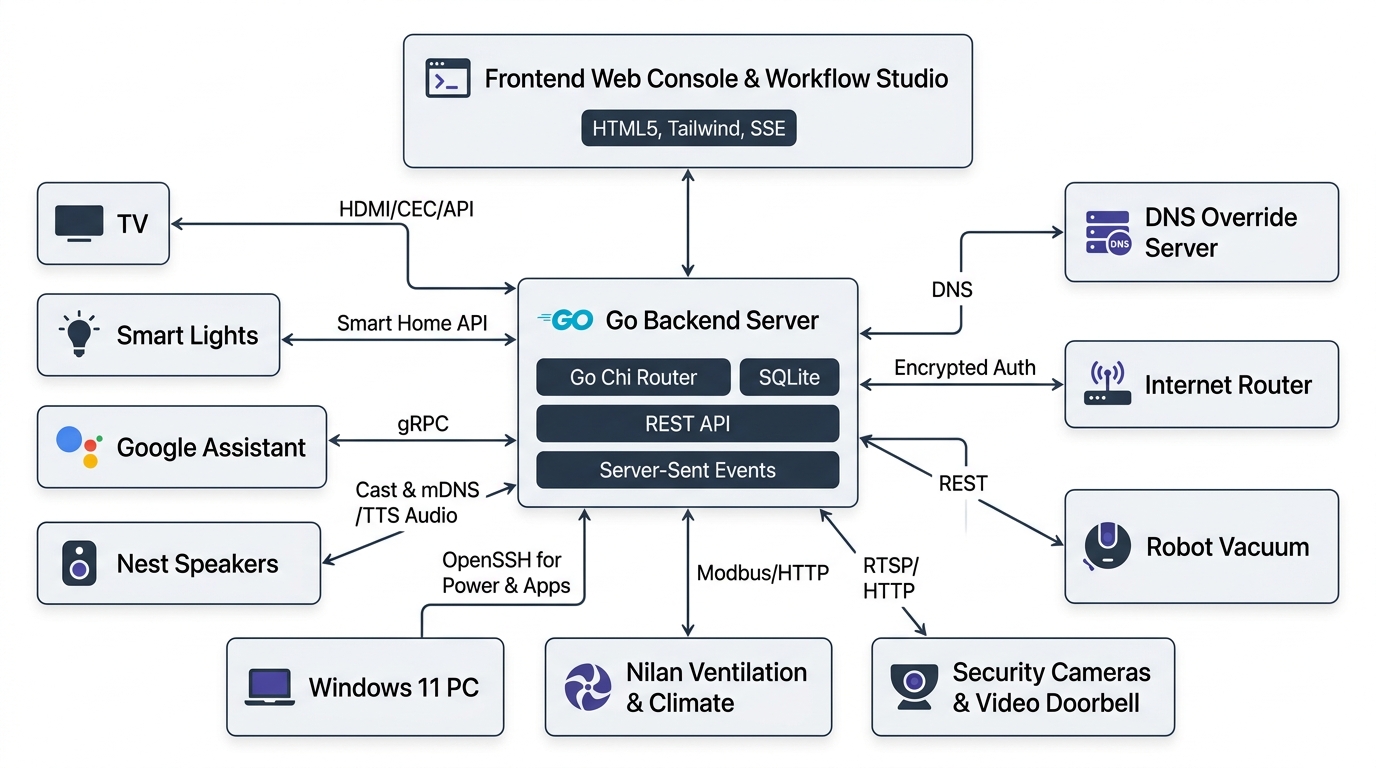
Go turned out to be an ideal choice here. It compiles to a single fast binary, uses almost no memory, and handles background goroutines and network I/O effortlessly.
Here is how the backend connects to different hardware around my home:
1. Google Assistant via gRPC (/api/v1/google-assistant, /api/v1/tv)
Directly reverse-engineering proprietary local TV protocols (like WebOS or encrypted network remotes) takes time, and I haven’t bothered to do that yet since I can always implement a direct driver later if needed.
As a pragmatic workaround, the backend connects directly to the Google Assistant SDK over gRPC. This allows sending programmatic voice and text commands like "switch input to HDMI 4 on Living Room TV" or "set living room lights to 30%", letting Google Home handle the low-level TV and lighting hardware for now.
2. Multi-Room Audio & TTS (/api/v1/speaker)
mDNS discovery locates Google Nest and Chromecast speakers on my local subnet. When an automation runs, the backend synthesizes voice announcements using Edge-TTS into an MP3 file and casts it straight to the target speaker.
3. Windows 11 PC Remote Control (/api/v1/pc)
I wanted to control my gaming PC from the couch without installing shady third-party remote agents. Since Windows 11 includes OpenSSH, the Go backend simply connects over SSH using golang.org/x/crypto/ssh and runs PowerShell commands under the hood:
Get-StartAppsqueries installed Start Menu applications.Get-Processchecks which apps are currently running.Start-Processlaunches games or apps remotely.- Power commands handle Sleep, Restart, and Shutdown.
4. Ventilation & Temperature Control (/api/v1/climate, /api/v1/nilan)
Our house uses a Nilan heat-recovery ventilation system. The Go backend talks to the unit over local Modbus/HTTP, giving me endpoints to change fan speeds (like triggering a boost mode while cooking) and read or adjust target room temperatures.
5. Cameras, Doorbell, and Robot Vacuum (/api/v1/cameras, /api/v1/doorbell, /api/v1/vacuum)
Security camera RTSP feeds, doorbell snapshot triggers, and robot vacuum cleaning cycles are all wrapped into simple endpoints. A POST /api/v1/vacuum/clean starts the vacuum without opening the vendor app.
6. Router Reboot & Network Gateway (/api/v1/internet)
My WiFi router doesn’t have an official public API, but its web interface uses a challenge-response login flow with RSA PKCS1 and AES-128-CBC encryption. The agent reverse-engineered the handshake in Go so the server can monitor gateway connectivity and reboot the router automatically if the internet drops.
7. Custom DNS Override Server (/api/v1/dns)
We also embedded a lightweight DNS server (miekg/dns) directly into the project. It handles wildcard domain overrides and probes CDN IP latency to ensure media streaming stays fast, while forwarding standard queries to Cloudflare (1.1.1.1).
The Frontend: Building Macros in the Workflow Studio
With all devices accessible via clean REST endpoints, building the frontend (frontend/) was straightforward: clean HTML5, Vanilla JavaScript, and Tailwind CSS.
The core feature is the Workflow Studio. It lets me chain device actions into custom sequences stored in SQLite:
[ Turn on TV ]
      ↓ (wait 5s)
[ Switch to HDMI 4 ]
      ↓ (wait 1s)
[ Launch Game on PC ]
      ↓
[ Set Living Room Lights to 20% ]
A few everyday workflows I use:
- Gaming Setup: Turns on the TV, waits 5 seconds for the screen to warm up, switches the input to HDMI 4, wakes up the PC, and launches the game.
- Deep Clean & Ventilate: Starts the robot vacuum, sets the Nilan ventilation unit to boost mode (fan speed 4), and announces over the kitchen Nest speaker that cleaning is underway.
- Goodnight Routine: Turns off the TV and PC, checks that the door is locked, sets the ventilation back to quiet mode, and turns off all lights.
Live Feedback with Server-Sent Events
When you click “Run Workflow,” the Go engine executes the sequence asynchronously in a goroutine and streams real-time step status back to the browser using Server-Sent Events (http.Flusher). The UI updates each step dynamically—showing countdowns for delays and green badges when actions complete.
How Antigravity + Gemini + Superpowers Built It
Managing gRPC channels, SSH connections, crypto handshakes, and hardware integrations is exactly the kind of project where quick chat-based AI tools usually fall apart. You end up in endless copy-paste loops fixing edge cases.
To build this system cleanly, I used Google Antigravity with Gemini 3.7, guided by the Superpowers orchestration framework.
The workflow looked very different from standard AI coding:
1. Interactive Q&A Before Code (Grill-Me Style Specs)
I didn’t sit down and write lengthy specification documents myself. Instead, before writing any subsystem, the agent conducted a structured, interactive interview with me (similar to the /grill-me workflow):
- The agent drilled into ambiguous requirements: “How should we handle offline PCs without blocking HTTP workers?”, “What fallback upstreams should DNS use if probing fails?”, “What encryption schemes does the router login endpoint require?”
- I answered its questions, picked between trade-offs, and defined my constraints.
- The agent then wrote comprehensive, structured specs in
docs/superpowers/specs/outlining API contracts, database schemas, and edge case strategies before writing any implementation.
2. Strict Test-Driven Development (TDD)
The agent implemented every backend feature test-first. It wrote Go unit tests (handlers_test.go and service_test.go) covering mock router handshakes, database queries, and scheduler jobs before writing the actual service code.
Running go test ./internal/... after every step guaranteed zero regressions across existing device handlers.
3. Subagent Orchestration
Antigravity divided up the tasks across specialized subagents running in parallel:
- A backend subagent wrote the concurrent Go services, SQLite tables, and SSE streaming handlers.
- A frontend subagent built the workflow studio UI and bound the SSE event listeners.
- A protocol verification agent created mock servers for the router encryption handshake and PC OpenSSH sessions.
4. Automated Verification Gates
Before claiming any task was finished, Antigravity ran the full test suite, compiled the Go binary, and verified that the frontend built cleanly. My role was simply reviewing the diffs and approving the verified checkpoints.
What’s Working Well
A few thoughts after running this setup daily:
- Local-first is instant: Because everything runs on my local network with direct connections (SSH, gRPC, local HTTP), actions happen with virtually zero latency. Pressing a button triggers the device in under 50ms.
- Go is a superpower for home servers: A single compiled binary with zero runtime dependencies and a tiny SQLite database is rock solid. It runs quietly in the background without hogging memory.
- Agentic coding is about specification, not syntax: I didn’t write any of the Go or JavaScript code. The productivity boost came from shifting my focus entirely to system architecture, edge case review, and interactive requirement grilling.
Building your own home automation hub takes a bit of initial effort, but having a clean, fast system that actually behaves exactly the way you want makes it well worth it.